SEARCH
  CASINO
  SPORTS
  LOGIN
LOGIN  SIGN UP
Play on the Go and Earn Wins with Kirgo App
A Kirgo progressive web app (PWA) compatible with Android and iOS mobile devices is available to play on the go and keep track of their progress more easily. This application does not require much storage space and can be installed directly from the website. Once installed, you can use it to play all of 6,500 games, including titles like Mega Wheel, Chicken Road 2 and Sugar Rush.
All offerings available on the website are also accessible on the Casino Kirgo App for US players. So you mostly have the platform in the palm of your hand.
How to Install and Use the Kirgo Gambling App
Since the Kirgo Online Casino App is a PWA, you have to download it from the official website using the relevant smartphone or tablet. You will not find native software on the Google Play Store or iOS Apps Store. Thankfully, the direct website installation is even quicker. Now, when I say installation, I do not mean the standard download process common with native software. PWAs are different and are generally added to a device’s home screen, a process that relies on certain browsers to be successful.
Android mobile users need the Chrome or Firefox browser to add the PWA, while those who own iOS devices must use the Safari browser. After installation, you can launch the PWA, register or sign into your account, fund it and start gambling. There is a sports and casino welcome bonus to choose from, and a VIP program to exploit for a reward-filled session.
How to Add the PWA on Android for US Players
You can add the Casino Online Kirgo App to your home screen by clicking on the Add to Home Screen icon in your Chrome browser menu and completing the installation prompt. I outline the steps to complete the process below:
- Use Chrome or Firefox: Go to the official website using the Chrome or Firefox browser.
- Trigger Browser Menu: Tap the browser’s main menu at the top right of your screen to bring up a list of options and choose the Add to Home icon.
- Install: Click the Add icon to start the download.
How to Add the PWA on iOS
To get the Kirgo Casino App on your iPhone or iPad, you need to hit the Share button when on the website and tap the Add to Home Screen icon that comes up. Like with the Android installation, you just have to complete the necessary prompts to start playing on your phone.
See how to add the PWA to the home screen.
- Use Safari: Visit the official website with the Safari browser.
- Go to Add to Home Screen Window: Hit the Share Button in the middle of the screen and tap the Add to Home Screen option.
- Add PWA: Tap on the Add button to add the PWA to your device.
Devices for Casino Kirgo App
For players from the USA, a standard Android and iOS mobile device with 3 GB of RAM and 50 MB of free space is good enough to run the Kirgo Gambling App. Though it is important to ensure that your device is either Android 5 or higher or iOS 13+. Smartphones, iPads and tablets that meet these requirements will allow you to gamble without glitches and sudden stops.
| Minimum Requirements | Android | iOS |
|---|---|---|
| OS Version | Android 5 or higher | iOS 13 or higher |
| RAM | 3 GB or more | 3 GB or more |
| Storage | 50 MB or more in free space | 50 MB or more in free space |
| Connectivity | Wi-Fi or at least 4G | Wi-Fi or LTE |
Online Casino Kirgo App Interface
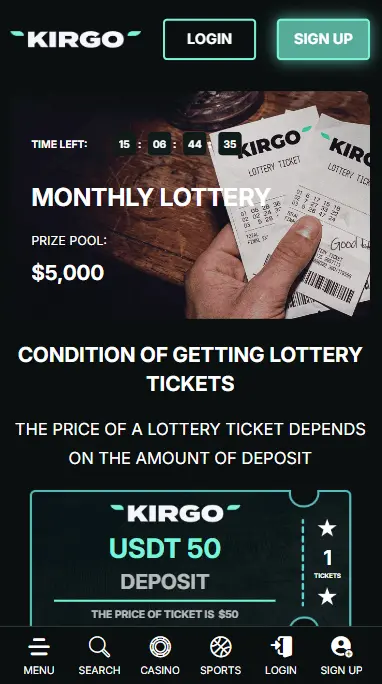
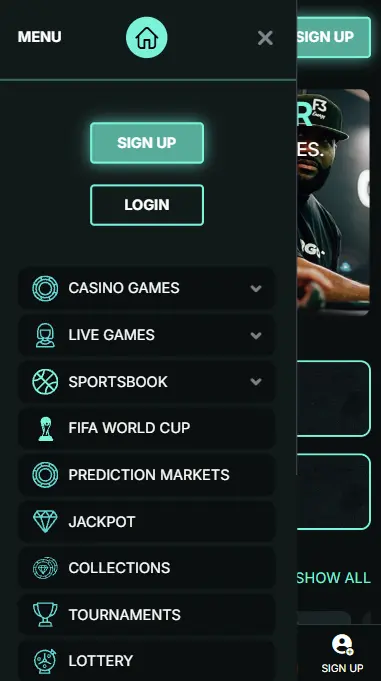
For Americans, the Kirgo Casino Mobile App interface is a replica of the PC website, featuring the same black background and similar green and white-colored icons. However, it is much more compact, allowing you to reach important menus that lead to the platform’s main offerings with a single click. You can find the Sign Up and Login menu at the PWA’s header and the Search, Casino, Sports and Main Menu tabs on the footer. The Main Menu tab features more icons that lead to promotions, games, support and language windows.
Kirgo’s main front page hosts over 50 games, divided into sections like Popular, Originals, Live, New and Bonus Buy. As you scroll downward, you will come across different links that lead to the casino’s Responsible Gambling resources, About Us Page, Affiliates and Certifications. You will also spot the Anjouan license number at the bottom of the screen.
Signing Up and Depositing With the PWA
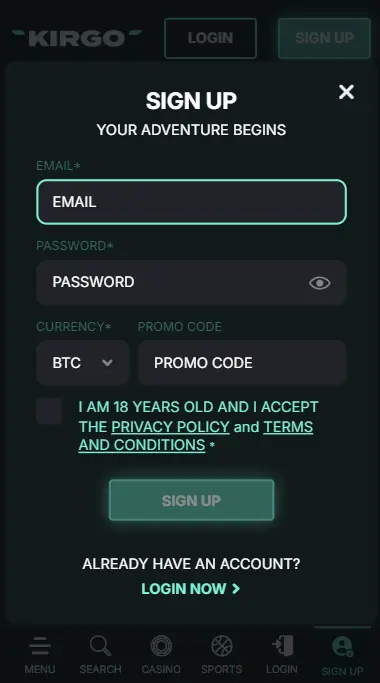
If you are an eligible adult with a provable source of income, you can create an account by providing a valid email and setting up an account password. Simply click the Sign Up button at the top of the Kirgo Crypto Casino Mobile App, fill out your email, and confirm that you are at least 18 years and respect the gambling terms and conditions. After registration, you will need to click the verification link sent to your email to confirm ownership of your created account.
As a registered player, you can fund your account with Bitcoin, Litecoin, Ethereum, Dogecoin, Cardano, Tron, Tether and 10+ altcoins. The minimum deposit for each coin is equivalent to $/€ 5, which is very considerate compared to what most sites are offering.
Benefits of Gambling with the PWA
For players from the US, Kirgo Crypto App, being a PWA, offers the perfect balance between website and native software gambling, allowing better flexibility, simplicity and improved personalisation.
Here is why this operator PWA stands out:
- Access to 6,500+ games, all performing optimally without glitches and sudden stops.
- Smooth performance like a native app, without needing regular updates.
- Simple system requirements. Smartphones with 4GB RAM and 100 MB free space are generally good enough.
Top Bonuses for Casino Kirgo Mobile App Users
All new members are eligible to claim a 225% welcome bonus worth up to €/$1100 + 50 FS if they deposit a minimum equivalent of €/$20. They also get the chance to activate 150 FS every Wednesday that they can use on top slots and earn good winnings.
See the top Kirgo Casino App bonuses in the table below:
Bonus Type | Offer | FS Game | Code | Min, Dep. | WR |
|---|---|---|---|---|---|
| Welcome Deposit (3-levels) | 225% up to €/$1100 + 50 FS | Sweet Bonanza or WIld Cash X9990 | WELCOME1WELCOME2WELCOME3 | €/$20 | 25x |
| Free Spins | Up to 150 FS | Not Specified | BSET1, BSET2, BSET3 | €/$20 | 35x |
Crypto Casino Kirgo Mobile App Security and Data Protection
For US customers, the Kirgo Mobile Application, just like the website, is secured with a 256-bit SSL encryption system that protects your information. So, all the data you share during registration and verification is secured and protected against external hack attempts. You can also activate Two-Factor Authentication with the Authy or Authenticator app on the Security window. Once activated, login attempts become more secure and often need to be approved from a linked device to be successful.
Every piece of information you share with the Kirgo App is protected and secured from unauthorized parties. We value your privacy rights and will never leave your information vulnerable.